

Contents
- Why Embedding YouTube Videos on X Matters
- How to Embed YouTube Video on Twitter (X)?
- Pro Tips to Maximize Engagement with Your Embedded Videos
- 1. Optimize video placement
- 2. Create compelling thumbnails
- 3. Craft engaging titles and descriptions
- 4. Use interactive elements
- 5. Ensure mobile responsiveness
- 6. Optimize video load times
- 7. Leverage video analytics
- 8. Incorporate social proof
- 9. Add captions and subtitles
- 10. Include a clear call-to-action
- Final Thoughts: Boosting Your Tweets with Embedded Videos
How to Embed YouTube Video on Twitter (X) Effectively
Sharing videos on X can be tricky if you don’t know the right steps. You’ve probably noticed that some tweets with videos get tons of likes and retweets, while others barely get noticed. If your YouTube videos aren’t grabbing attention, it could be because they’re not embedded correctly.
But don’t worry — you’re not alone in this! Many people struggle with making their video tweets look polished and professional. The good news is that embedding YouTube videos on X in 2024 is actually really easy.
In this article, we’ll show you easy steps to do it right so your tweets get the engagement they deserve. Before that, let’s weigh the importance of embedding YouTube videos on Twitter (X).
Why Embedding YouTube Videos on X Matters

Embedding YouTube videos on X has become a powerful strategy for content creators, businesses, and influencers. Let’s explore why embedding YouTube videos on X makes such a significant impact.
1. Maximizing audience reach across platforms
X is home to a staggering 570 million monthly active users, a massive audience to tap into. By embedding YouTube videos, you’re positioning your content in front of this highly active user base. More importantly, it encourages users to engage with your content without leaving the platform.
A study by Sprout Social shows that over half of social media users like watching video content from the brands they follow. Since X is made for quick, easy-to-consume content, embedding YouTube videos fits perfectly. Rather than just sharing a link to a YouTube video (which makes users leave X), embedding the video lets them watch it right there, leading to more engagement.
2. Higher engagement metrics and user interactions
According to Twitter Business, tweets with videos get 10 times more engagement than those without videos. Also, videos on X are six times more likely to be retweeted than posts with just photos. This kind of interaction is important because every retweet, like, or comment helps the tweet reach more people, increasing its chances of going viral.
Case Study: Nike’s Viral Campaign
Nike is an example of a brand that uses embedded YouTube videos on X to great effect. During their “Just Do It” anniversary campaign, Nike embedded high-quality YouTube videos on X. Not only did the video ads gain millions of views, but each tweet also experienced high engagement rates (likes, retweets, comments). The seamless in-app viewing experience contributed to the video’s viral spread across both platforms.
3. Greater SEO benefits
X is a platform that Google indexes well, which means your tweets, even with videos, can show up in Google search results. By embedding a video in your tweet, you not only increase its visibility on X, but you also improve its SEO ranking on YouTube and Google.
According to Moz, search engines give priority to rich media such as videos, making them 53 times more likely to appear on the first page of search results compared to regular text. Embedding YouTube videos on X, where user interaction is high, further improves the chances of ranking higher.
4. User experience: Keeping followers engaged on X
Adding YouTube videos directly to X makes things easier for users. When you add a YouTube video, X shows the video in its player, so people can watch it without leaving the app. This makes it simpler and more enjoyable for users to watch and interact with the videos.
5. Multi-platform strategy: amplifying content longevity
Think of social media posts like fireworks—they burst brightly and then fade away quickly. On platforms like X , a tweet’s sparkle lasts only about 15-18 minutes before it gets lost in the shuffle of new posts.
But here’s a trick to make your tweets shine longer: include a YouTube video. People on X really like videos and spend more time watching and interacting with them. This means that a tweet with a video can stay interesting and relevant for a longer time. As people watch, share, and retweet the video, your tweet keeps catching attention and doesn’t fade away so fast!
6. Monetization opportunities
X is getting new ways to help people make money. They’re introducing features like Subscriptions (previously called Super Follows) and Tips, which let users earn money from their content.
But there’s another way to boost earnings on X—by sharing YouTube videos. Here’s how:
- Boosting campaigns: If you’re an influencer or a brand, you can use X to run targeted campaigns. For example, you could share a YouTube video for a promotional campaign. This can attract sponsorships or paid partnerships because brands see that you have a strong, engaged audience.
- More views, more money: When you share YouTube videos on X, it can lead to more views on those videos. More views mean more ad revenue for the video creators. So, sharing popular videos can help them make more money.
How to Embed YouTube Video on Twitter (X)?
Embedding YouTube videos on Twitter is a simple process, you only need to follow the steps below. However, for ease, we have separately explained them for mobile and desktop users.
i. Embed a YouTube video on Twitter using Desktop
Step 1: Open YouTube
Go to your web browser, Chrome, or whatever you use, and search for YouTube. Once you are on YouTube, navigate to the video you want to share on Twitter.

Now, look for the “Share Button” underneath the video. Usually, it is located under the title and on the right side. Click on it to continue the process.

Step 3: Choose the copy link or select Twitter (X)
Now, you’ll see various options for sharing your chosen video. You can share it directly to Twitter/X or copy the video link to paste it into the tweet manually.

If you press “choose” X, it will automatically navigate you to your Twitter; however, if you copy a link, then go to your Twitter profile manually.
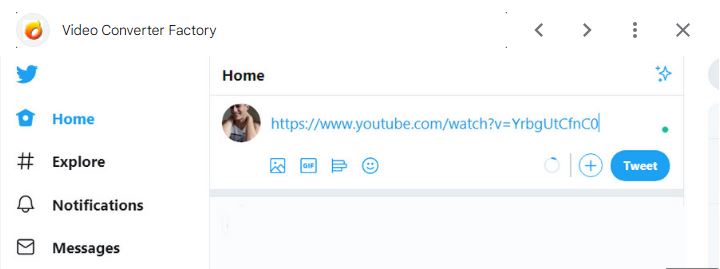
Step 5- Customize your tweet.
Now paste the link in the tweet, and then customize the tweet. You can write the message whatever you want to write. You can add text and hashtags or mention the users.

Step 6- Post tweet
Then, check and ensure the tweet is ready, and push the “tweet” button to display it on your page. After a few seconds of process, it will appear on your Twitter profile.

ii. Embed YouTube video using Mobile
Step 1: Open the YouTube app
From your mobile device, look for the YouTube app and click on it to access it.

Step 2: Browse the video
Now, search for the YouTube video you want to embed on Twitter.

Step 3: Play the video
Then, click on the video to play it on your mobile device.

Now, look for the “Share” button in the YouTube app. It is also located underneath the video on the right side. Click on it to see the options to embed your video.

Step 5: Choose the “X” or copy the link
Like the desktop, you also have two options here to embed your video on Twitter. Directly select the “X” from the list or copy the link to share it manually on your wall.

Step 6: Go to your Twitter profile
It will navigate you to your Twitter profile if you select “X”; however, for a copy link option, you will need to open it manually.

Step 7: Post a tweet
Your video link will appear automatically in the tweet if you select “X”; otherwise paste the link in a new tweet manually. Once done, type your message and hashtags and tag the users you want. Now, post it on your wall.

Pro Tips to Maximize Engagement with Your Embedded Videos
Embedding videos on your website or blog posts can significantly boost engagement, but to truly maximize their impact, you’ll need to follow a few key strategies. Here are some pro tips to enhance your video engagement.
1. Optimize video placement
Placement is crucial. Position your embedded videos where they naturally fit within the context of the content. For example, place explainer videos near complex topics or tutorials within how-to articles. Ensure the video is visible without requiring users to scroll excessively, preferably above the fold or within the first few sections of the page.
2. Create compelling thumbnails
Thumbnails act as the first impression of your video. Use high-quality, eye-catching images with clear visuals and minimal text. A well-designed thumbnail can significantly increase click-through rates. Consider using contrasting colors and expressive imagery to draw viewers in.
3. Craft engaging titles and descriptions
Your video title should be descriptive yet intriguing, prompting users to click and watch. Pair it with a concise description that highlights the value or unique points of the video. Incorporate relevant keywords for better searchability, and include a call-to-action (CTA) encouraging viewers to engage further, like subscribing or visiting a related page.
4. Use interactive elements
Leverage interactive elements such as annotations, cards, and end screens to engage viewers actively. These features can direct viewers to related content, and prompt them to take actions like signing up for a newsletter or offering additional resources.
5. Ensure mobile responsiveness
With the increasing use of mobile devices, ensure your embedded videos are mobile-friendly. Use responsive video players that adjust automatically to different screen sizes. Test on various devices to confirm a seamless viewing experience.
6. Optimize video load times
Fast-loading videos are crucial for maintaining engagement. Compress your videos and use a reliable content delivery network (CDN) to ensure quick load times. Avoid large file sizes that can slow down page performance and potentially frustrate viewers.
7. Leverage video analytics
Utilize video analytics tools to track viewer behavior, including watch time, drop-off rates, and interactions. This data can provide insights into what’s working and what needs improvement. Use this information to refine your video content and placement strategies.
Embed videos that feature testimonials, user reviews, or case studies to build credibility. Social proof can enhance trust and persuade viewers to engage more deeply with your content or take desired actions.
9. Add captions and subtitles
Captions and subtitles not only make your content accessible to a broader audience, including those with hearing impairments, but they also help with engagement by making the content easier to follow. They can be particularly useful for viewers who are watching in a noisy environment or without sound.
10. Include a clear call-to-action
Every video should have a clear CTA, whether it’s directing viewers to another piece of content, encouraging them to subscribe to your channel, or prompting them to make a purchase. Position your CTA strategically, either at the end of the video or throughout, depending on the content.
Final Thoughts: Boosting Your Tweets with Embedded Videos
Embedding YouTube videos on Twitter (X) is a powerful way to enhance your content and engage your audience. By following the simple steps outlined in this guide, you can seamlessly integrate visually appealing and informative videos into your tweets.
Remember to choose relevant videos, write engaging captions, and optimize your tweets for discoverability to maximize their impact. By effectively utilizing YouTube video embedding, you can drive more traffic to your content, increase your audience reach, and foster stronger connections with your followers.



Md Hamim Khan
Md Hamim Khan is the Content and SEO Manager at wpWax, where he creates engaging content that helps improve online visibility. When he’s not at work, he loves playing cricket and enjoys chatting with friends, family, and colleagues.


Leave a Reply
You must be logged in to post a comment.