

Contents
- Benefits of Creating a PPT Submission Directory Website
- i. Centralized resource hub
- ii. Organized content management
- iii. Enhanced collaboration
- iv. Improved accessibility
- v. Monetization opportunities
- vi. Increased visibility for content creators
- vii. SEO and traffic growth
- viii. Simplified submission process
- ix. Customizable access levels
- x. Analytics and insights
- Creating a PPT Submission Directory Website
- Conclusion
How to Create a PPT Submission Directory Website
Building a PPT submission directory website that works well for both submission owners and readers can be tough. As an admin, you want to create a site that’s easy to use and navigate, but knowing where to start can be confusing.
Let’s think about how frustrating it is when submission owners struggle to upload their presentations or readers can’t find what they’re looking for. A site that’s hard to use doesn’t just waste time; it can also drive users away, making your job even harder.
What if you could create a PPT submission directory website that simplifies the submission process and helps readers find content quickly and easily? In this guide, we’ll show you how to build a user-friendly, efficient site that becomes a trusted resource for all things PowerPoint.
Benefits of Creating a PPT Submission Directory Website
Creating a PowerPoint (PPT) submission directory website can offer a range of benefits, particularly for educational institutions, businesses, and content creators. Here are some key advantages:
i. Centralized resource hub
A PPT submission directory website serves as a centralized platform where users can easily submit, share, and access PowerPoint presentations. This creates a valuable repository of resources that can be accessed by anyone with permission, streamlining the process of finding and sharing presentations.
ii. Organized content management
With a directory website, presentations can be categorized by topic, author, date, or any other relevant criteria. This organization makes it easier for users to locate specific presentations, reducing time spent searching for resources.
iii. Enhanced collaboration
Such a platform fosters collaboration among students, educators, professionals, and content creators. Users can upload their presentations for peer review, feedback, or collaboration, enhancing the overall quality of content and learning outcomes.
iv. Improved accessibility
By hosting PPTs on a directory website, users can access presentations from anywhere with an internet connection. This is particularly useful for remote learning or work environments, where users need access to educational or professional materials on the go.
v. Monetization opportunities
A directory website can be monetized by offering premium access to certain presentations, ad placements, or even by charging a fee for uploading presentations. This can be a lucrative avenue for generating revenue while providing valuable resources to users.
vi. Increased visibility for content creators
A PPT submission directory website offers educators, businesses, or content creators a platform to showcase their work. This increased visibility can lead to recognition, new opportunities, or even collaboration requests.
vii. SEO and traffic growth
A well-optimized directory website can attract significant traffic through search engines. As users search for specific topics or presentations, your website can become a go-to resource, boosting your site’s visibility and authority.
viii. Simplified submission process
The submission process on a directory website can be made user-friendly, with forms or upload buttons that make it easy for users to submit their PPTs. This encourages more submissions, enriching the repository of content available.
ix. Customizable access levels
The website can offer different access levels, such as public, restricted, or private. This ensures that sensitive presentations are protected, while still allowing broader access to less confidential materials.
x. Analytics and insights
The directory website can provide valuable insights into which topics or presentations are most popular by tracking the number of views, downloads, and user interactions. This data can inform future content creation and marketing strategies.
Creating a PPT Submission Directory Website
Step 1: Install & activate Directorist
Navigate to the WP Admin Dashboard > Plugins > Add New > Search for the keyword ‘directorist’ > Hit the “Install Now” button (as indicated with arrows).

Next up, you need to activate and configure the setup wizard to make a fresh start. We recommend you to visit the official documentation so that you can configure it perfectly or the way you want.
Step 2: Install a free directory theme
Directorist is compatible with all WordPress themes, so you can choose any theme you like. However, selecting a directory-specific theme can significantly enhance your website’s overall appearance and functionality.
To do this, you can install the BestListing theme, which is free.
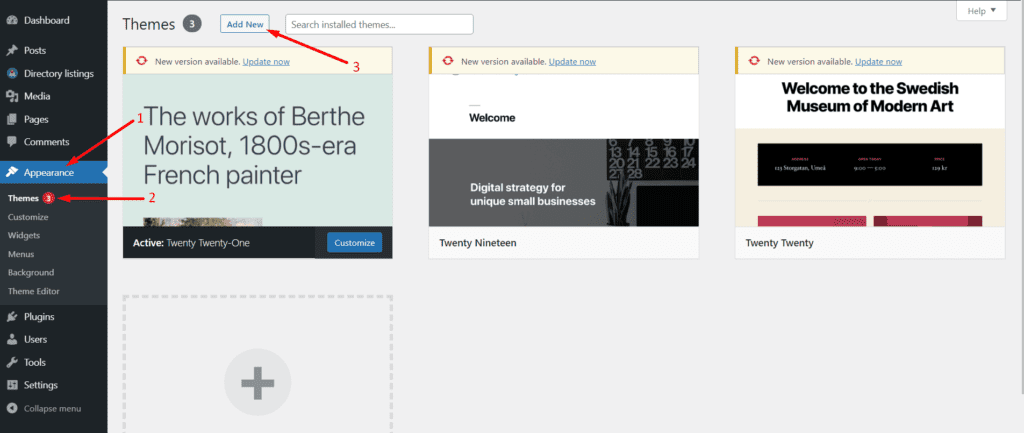
Once you get the theme, navigate to the WP Admin Dashboard > Appearance > Themes > Add New.
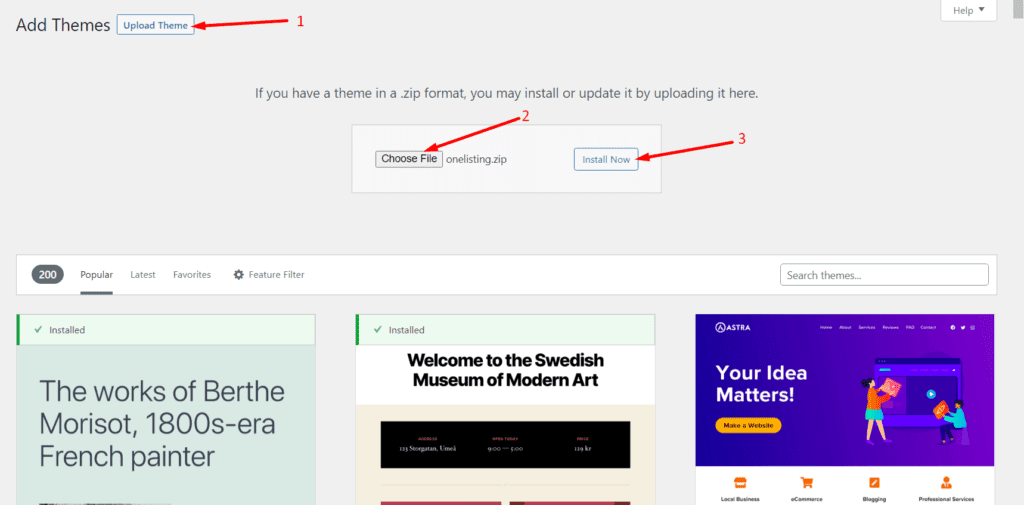
Then click on Upload Theme > Choose File and select the ‘bestlisting.zip’ > Install Now.
Now, activate the theme to take an effect:
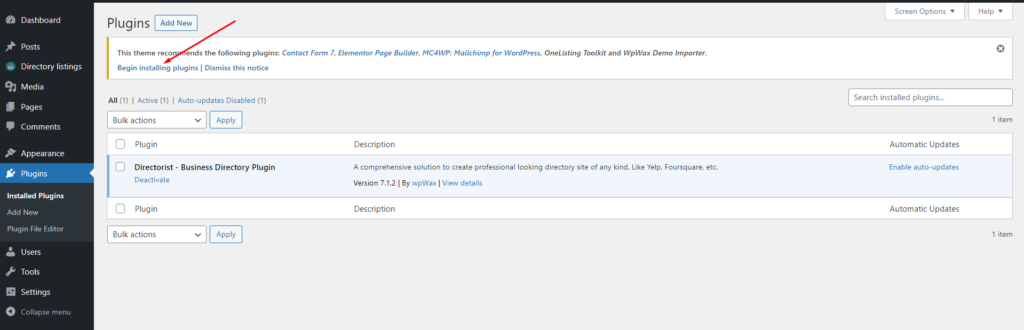
Upon installing the theme, you will see some plugins and tools suggested to install. So, make sure you have installed all the suggested ones so that the theme works perfectly fine. For example, you must install & activate the Elementor, Contact Form 7, MailChimp, and a Theme ToolKit. So, we recommend you hit the “Begin Installing Plugins” option to install them all at once.
And that’s it!
A directory submission website must be user-friendly in a way that visitors can find their listing item in a flash of an eye. Upon creating relevant categories, Directorist can suggest related listings according to the visitors’ choice.
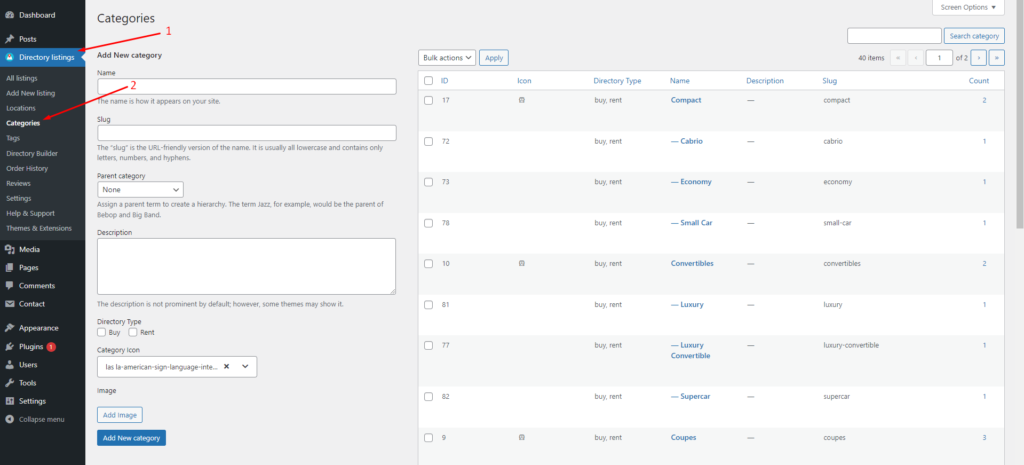
To this end, you need to create a set of relevant categories and tags. In the Directorist menu, you will find both of these items where (category) you can also add images, assign the category to a parent one, give a description, add icons & colors.
To do so, you just need to go to the Directory Listings > Categories > Fill out the fields > Hit the “Add New Category” button.
Similarly, you can add tags so that Directorist can show the relevant listing item to the visitors. You can do it from Directory Listings > Tags > Enter Credentials > Add New Tag.
Step 4: PPT listing submissions by publishers
To add listings to your PPT submission directory website, navigate to the WP Admin Dashboard > Directory Listings > Add New Listing.
Most PPTs will be added or submitted by PPT owners/publishers. You can review these PPTs to ensure they adhere to your community standards. Additionally, you can charge a fee for each PPT submission.
To add PPTs, publishers need to have a registration with your site. After the registration, they can freely add more PPTs from the “Add Listings” option. You can check the progress whether the submission is okay or not.
Step 5: Adding Advanced features: Monetizing your PPT submission directory website
Monetizing is what makes your directory submission website lucrative. With Directorist, you can monetize your website in many ways:
- Charge for listings (Free)
- Featured listings (Free)
- Allow businesses to claim listings (Premium)
- Charge for viewing private listings (Premium)
- Allow private/sponsored advertising (premium)
- Charge for membership (Premium)
- Sell business leads (Premium)
- Promote affiliate products (Premium)
- Allow sponsored articles/guest posting (Premium)
- Paid ad placement (Premium)
Step 6: Adding a Free Payment Gateway
Directorist free version supports only the offline bank transfer method to receive payments. To add your bank account details, navigate to the WP Admin Dashboard > Directory Listings > Settings > Monetization > Offline Gateways Settings > Insert your details > Save changes.
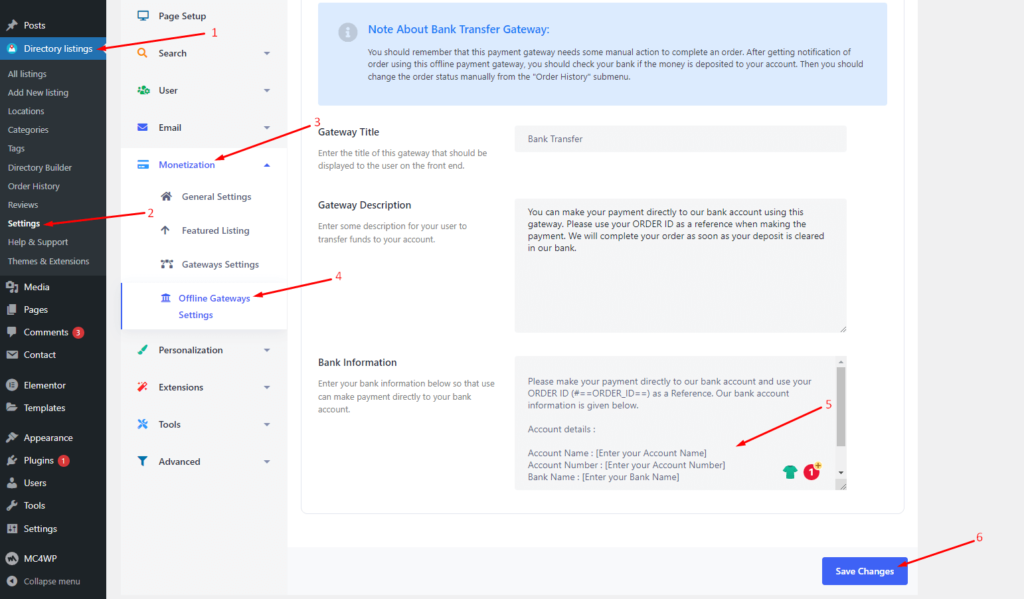
Note about Bank Transfer Gateway:
- You should remember that this payment gateway needs some manual action to complete an order. After getting a notification of an order using this offline payment gateway, you should check your bank if the money is deposited into your account. Then you should change the order status manually from the “Order History” submenu.
- Apart from the offline Bank transfer method, Directorist also supports online payments gateways like Stripe, PayPal, and Authorize.net. However, they are available in the premium version only.
Conclusion
Using Directorist, setting up a PPT submission directory site in WordPress is both simple and efficient. The free version offers an impressive array of features typically reserved for premium versions of other directory tools, making Directorist a highly recommended option.
We have demonstrated how to create a PPT submission directory site affordably. If you encounter any difficulties with the steps outlined above, feel free to reach out to us. We take your queries seriously, and a team member will respond to you. If you’re already using Directorist, please share your thoughts in the comments section.



Md Hamim Khan
Md Hamim Khan is the Content and SEO Manager at wpWax, where he creates engaging content that helps improve online visibility. When he’s not at work, he loves playing cricket and enjoys chatting with friends, family, and colleagues.


Leave a Reply
You must be logged in to post a comment.